Sarah Drasner
5
min read
Bento Grid Layouts in Modern UI
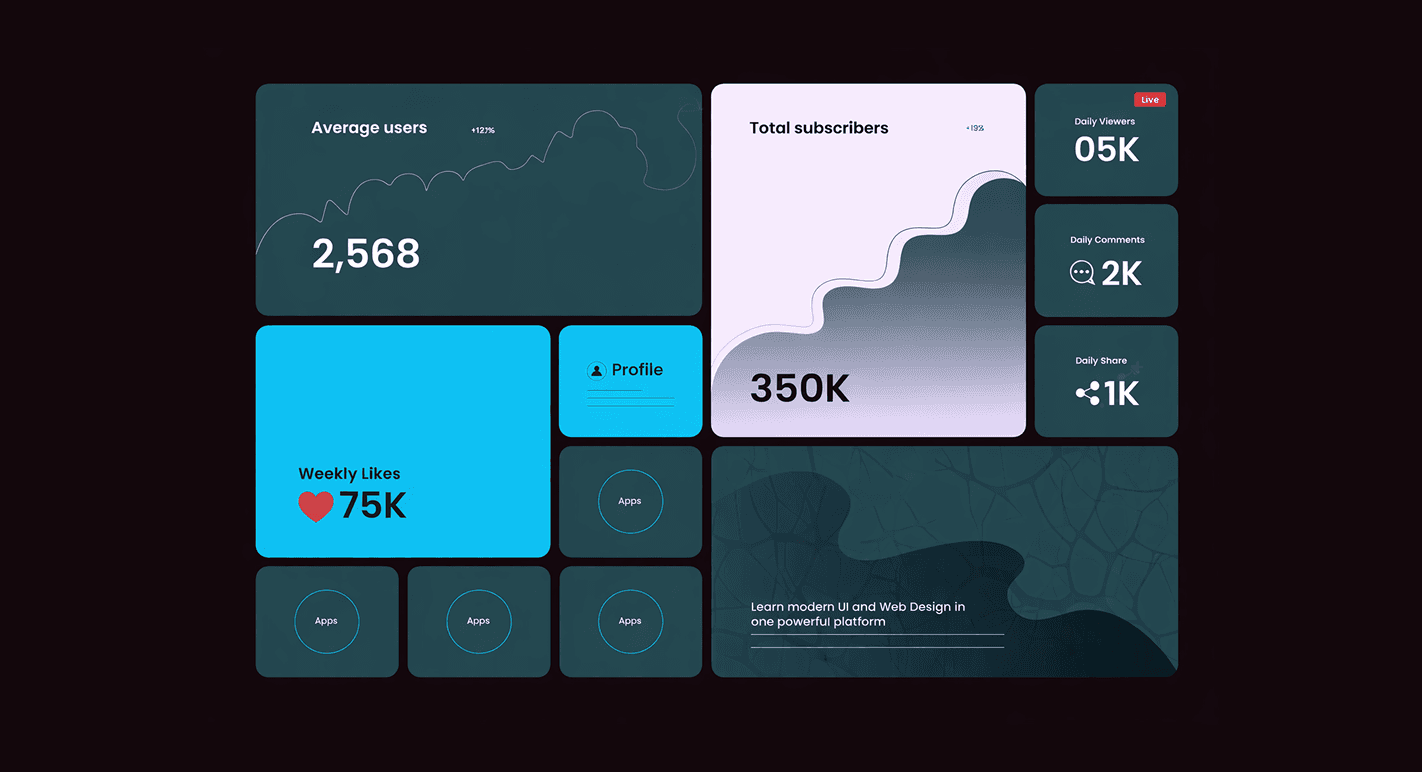
Bento grids blew up because they solve a real problem: how do you show a lot of information without overwhelming people?
Most layouts either go:
Too rigid → boring, predictable
Too freeform → chaotic, hard to scan
Bento grids sit right in the middle. Structured, but flexible. Visual, but still usable.
But here’s the truth: most designers are copying the look and missing the logic.
What a Bento Grid Actually Is (Beyond the Aesthetic)
At its core, a bento grid is:
A modular layout made of uneven card sizes
Each card representing a distinct piece of content or function
Organized for scannability first, not symmetry
It’s not about making things look “cool.”
It’s about creating entry points into your product.
If everything screams equally, nothing gets attention. Bento grids fix that.
Why Bento Layouts Work So Well
1. Visual Hierarchy Without Complexity
Instead of forcing users through a linear flow, you let them choose their path.
Big cards = high priority
Small cards = supporting info
No explanation needed. The layout itself communicates importance.
Actionable:
Stop relying only on typography for hierarchy—use size and placement as your primary signals.
2. Perfect for Feature-Dense Products
Especially in SaaS, you’re always fighting this battle:
“We need to show everything… but not overwhelm users.”
Bento grids let you:
Highlight key features
Keep secondary features accessible
Avoid long scroll fatigue
But don’t lie to yourself:
If your product is complex, the layout won’t fix bad prioritization.
3. Designed for Scanning, Not Reading
Users don’t read—they scan.
Bento layouts:
Break content into digestible chunks
Create natural stopping points
Reduce cognitive load
Compare that to a long landing page wall of text—no contest.
Where Designers Screw This Up
Let’s be blunt.
1. No Clear Priority
Everything ends up looking equally important.
Result: users don’t know where to click first.
Fix:
Force yourself to rank content brutally. If everything is “important,” you’ve already lost.
2. Overdecorated Cards
Gradients, shadows, icons, animations—stacked on every card.
Now it’s noise.
Fix:
Pick 1–2 cards to be visually rich. Keep the rest minimal.
3. Inconsistent Interaction Patterns
One card is clickable, another has a button, another is static.
That inconsistency kills usability.
Fix:
Define interaction rules:
Entire card clickable?
Button only?
Hover states?
Then stick to it.
Designing a Bento Grid That Actually Works
1. Start With Content, Not Layout
Wrong approach:
“Let’s make a bento grid.”
Right approach:
“What are the 5–7 most important things users need here?”
Then map those into cards.
2. Use a Flexible Grid System (But Not Random)
Behind every “organic” bento layout is structure.
Base grid (e.g., 12 columns)
Cards spanning different column widths
Consistent spacing system
If your spacing is inconsistent, the whole layout feels amateur.
3. Limit the Number of Cards
More cards ≠ better experience.
Sweet spot:
5 to 9 cards max per section
Anything beyond that turns into visual clutter.
4. Design for Responsiveness Early
This is where most bento layouts break.
Desktop looks great. Mobile? Disaster.
Rules:
Stack intelligently (not just shrink)
Preserve hierarchy on mobile
Avoid awkward card cropping
If your layout doesn’t translate to mobile, it’s not a good layout.
Where Bento Grids Work Best
SaaS landing pages
Product feature overviews
Dashboards (summarized views, not deep data)
Portfolio websites
Where They Don’t
Data-heavy analytics dashboards
Long-form storytelling pages
Processes that require strict step-by-step flow
Don’t force it where it doesn’t belong.
Strategic Advantage (If You Use It Right)
Here’s the real win:
Bento grids reduce decision friction.
Instead of pushing users down one path, you:
Present clear options
Let them self-navigate
Guide them visually without forcing them
That increases engagement and perceived control.